
What it does
Voquill turns your voice into text right where your cursor is. Hold a key to talk, or toggle, and it types into any app: emails, docs, browsers, editors. It's a free, open-source alternative to paid cloud dictation: everything runs on your own computer, so your voice never leaves it.
- Works in any app: emails, documents, browsers, editors and chat, with a global hotkey
- 100% local and private: speech recognition and AI run on your computer, with no accounts or telemetry
- On-device AI cleans up your dictation: grammar, formatting and your own writing styles
- Voice macros run key sequences, shortcuts and commands from spoken trigger words
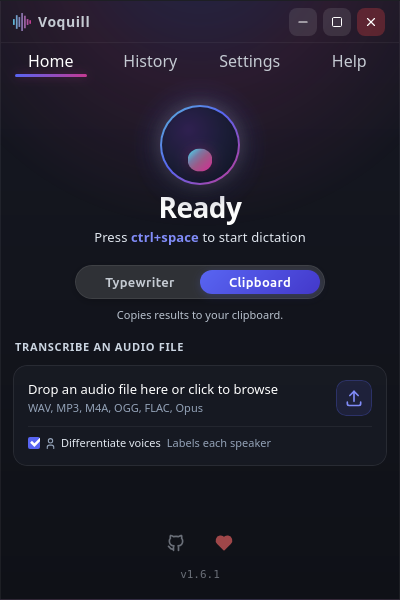
- Transcribes audio files and tells different speakers apart
- Truly free: GNU AGPLv3, with no subscriptions, paywalls or "Pro" tier
“...the best free Windows and Linux option I've found without any annoying upselling.”Read on WIRED →
Three Core Workflows
Speak → Text Everywhere
Press your global shortcut, speak, and text appears directly at your cursor in any application—web browsers, email, word processors, notes, or messaging apps.
Audio → Transcript & Diarization
Import voice recordings (WAV, MP3, M4A, FLAC). Automatically identify different speakers (`Speaker 1`, `Speaker 2`) and review transcripts with built-in audio playback.
Speech → Finished Writing
Instant filler-word removal plus built-in local AI post-processing. Transforms rough spoken thoughts into clean emails, formatted notes, or custom writing styles—100% offline without sending text to any cloud service.
Full Platform Capabilities
- Hands-Free Voice Macros & Key Automation Trigger multi-step key sequences, app shortcuts, and native system commands hands-free using spoken trigger words with Voice Activation Thresholds.
- Local AI Voice Feedback & Voice Studio Instant spoken confirmations powered by on-device neural TTS with authentic tactical radio, cockpit AI, and sci-fi acoustic effects.
- On-Device AI & Local LLM Post-Processing Runs full AI language models (LLMs like Qwen & Llama) directly on your computer to fix grammar, reformat notes, or rephrase rough dictation into clean text—100% offline with zero cloud fees.
- Custom AI Prompts & Style Presets Choose or create custom AI prompts to shape your voice output: switch between professional emails, structured notes, or create custom writing styles.
- Custom Dictionary & Technical Words Add unique names, jargon, acronyms, and specialized terminology to your personal dictionary so names and technical terms are recognized more reliably.
- Instant Filler-Word Stripping Instant deterministic removal strips "uh", "um", "like", and "you know" before text reaches your cursor, without needing a full AI model pass.
- 100% Private & Offline Speech recognition and AI models run locally on your computer. Your voice and text stay private on your device with no accounts or telemetry.
- Works in Any Application Type directly into any email, document, browser, editor, or chat window on Windows and Linux using customizable global hotkeys.
- Differentiate Voices & Transcribe Files Detect and label distinct speakers (`Speaker 1`, `Speaker 2`) in live dictations or drag-and-drop audio files (WAV, MP3, M4A, FLAC, OGG).
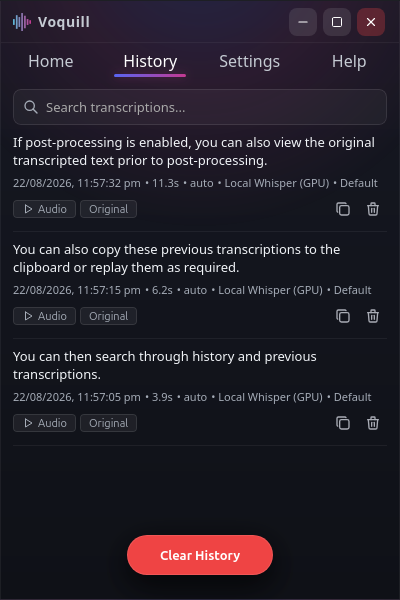
- Searchable Recording History & Playback Search past dictations instantly with full-text search, listen back to original voice recordings with built-in audio playback, and compare raw vs. AI-cleaned text.
Truly Free
GNU AGPLv3 licensed. No subscriptions, no paywalls, no accounts, and no "Pro" tiers—just a powerful open-source tool for everyone.
100% Private & Local
Private by default. On-device speech recognition powered by Whisper.cpp & Parakeet with zero telemetry. Optional cloud APIs if you choose.
Native & Cross-Platform
First-class Linux support (Wayland XDG Portals, X11, .deb, .rpm, AppImage) and native Windows WASAPI audio. Native keyboard simulation.
Walkthrough Video
FOSS Voquill is the original project, first published in July 2025 by Jack Brumley and built to give back to the open-source community.